

Live TV & Recording
Watch and record live TV.
Browse the programme guide, tune to a channel and save broadcasts for later. Media Server connects a compatible HDHomeRun tuner to Pixel Brite’s live viewing and recording controls.
The web app and server are available now.
See what’s on before choosing a channel.
Search for a channel or programme, move through the schedule, or jump to a date and time. Choose a live programme to start watching.
Open a programme’s menu to see its details, record one broadcast or follow the series. The guide keeps the schedule and recording choices together.
Enlarge the guide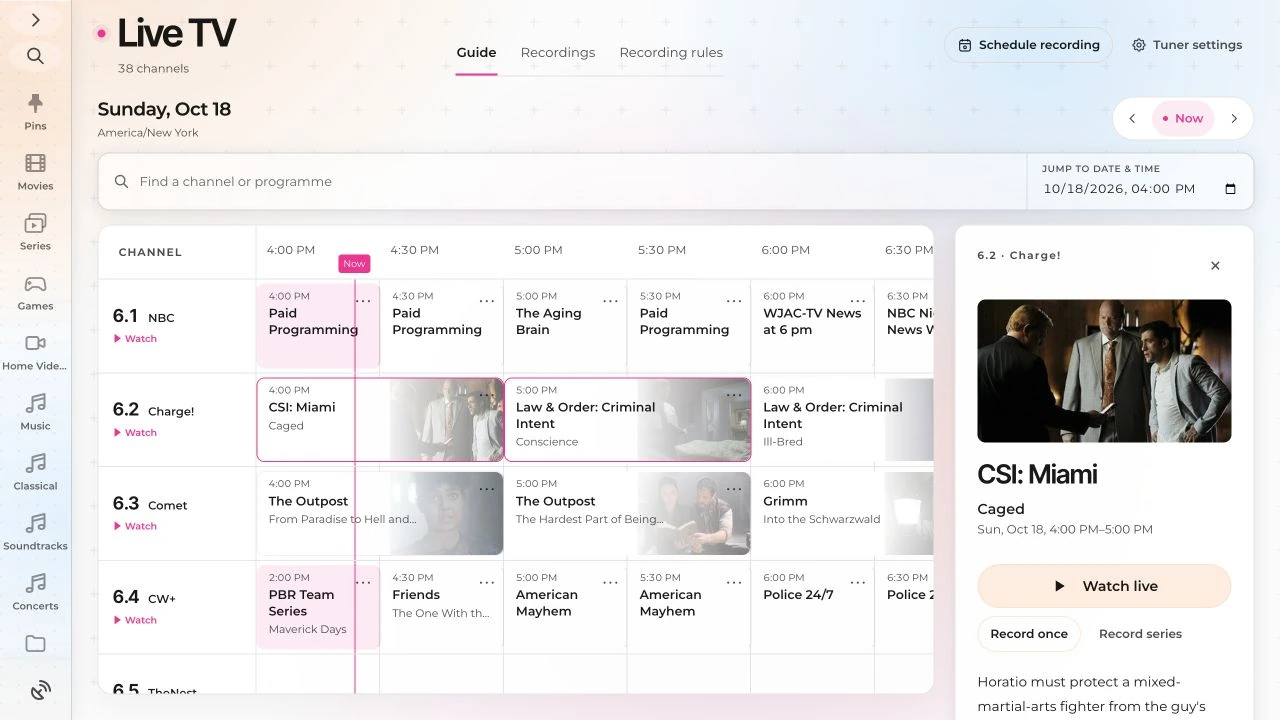
Choose what to record and how to keep it.
The tuner receives. Media Server records.
- HDHomeRun tuner
- A compatible network tuner supplies the channels available from its connected TV source.
- Media Server & storage
- Media Server handles live viewing and saves recordings. Keep it running for scheduled broadcasts, with storage available for the recordings.
- Programme guide
- A guide source supplies programme names, times and series information. Match it to the tuner’s channels to browse and record from the schedule.